Wedding Player

Wedding Player

The app that runs your wedding ceremony music, start to finish. Offline, pre-programmed, and panic-proof. The person pressing play can't get it wrong.

Download on the App Store Get it on Google Play — coming soon Free to Try Coming Soon
Couples
£7.99 one-off purchase No subscription
In the Press
"Ceremony music often gets left until surprisingly late in the planning process, even though it completely shapes the atmosphere of the moment. Wedding Player was built specifically to help couples organise their wedding ceremony soundtrack."

Zoe Burke, Head of Brand at Bridebook

As featured in Bridebook, 9 Best Wedding Planning Apps

The app that just works on the day

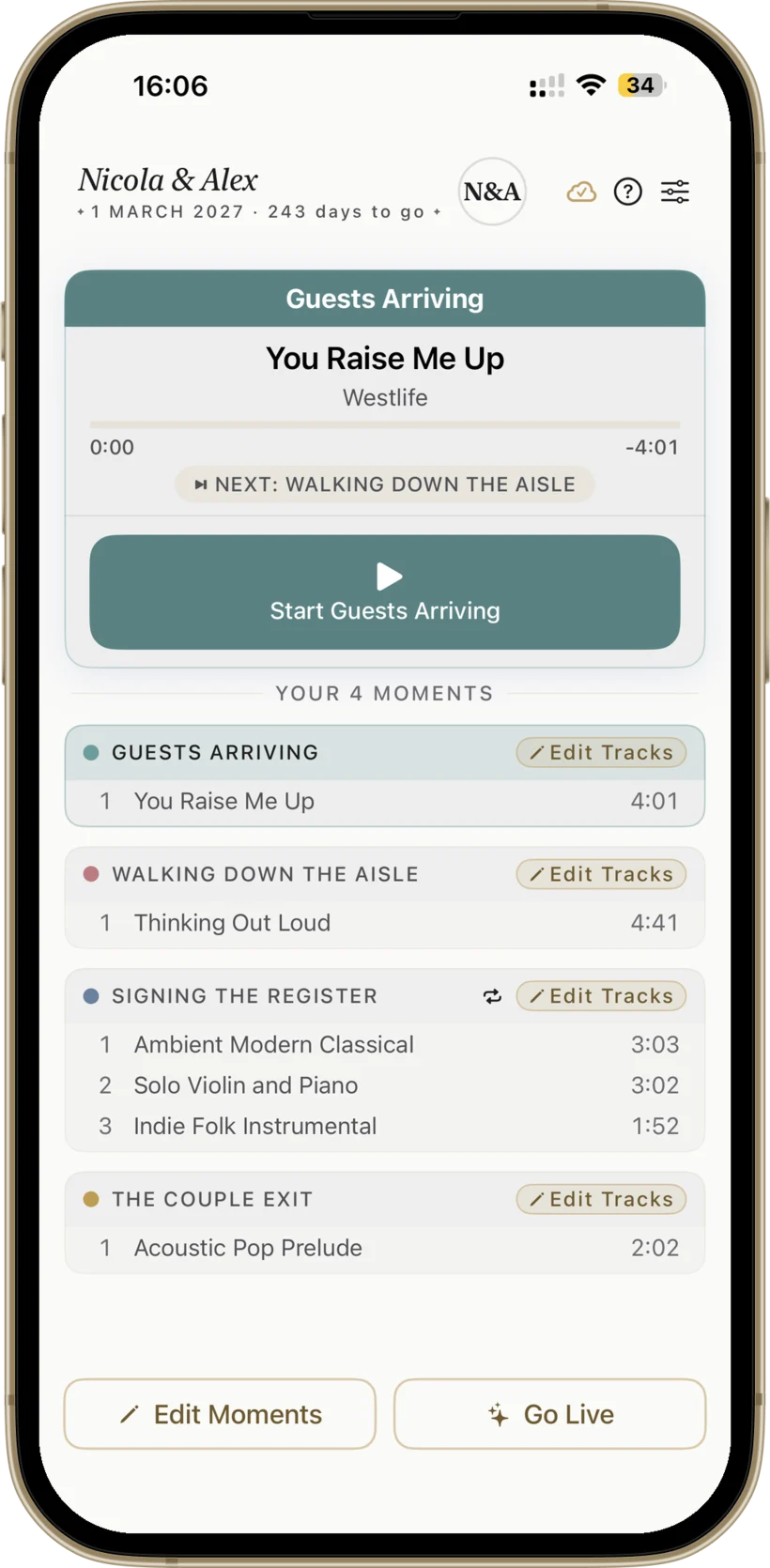
Previewing screenshots in light mode.

Wedding Player Originals, Included

A growing collection of fully licensed instrumental ceremony tracks, built into the app. Prelude, processional, signing, recessional. Classical to contemporary. No subscription, no licensing to chase. Browse and add inside any moment.

Wedding Player Originals catalogue Wedding Player Originals catalogue

Apple Music Integration (iOS)

If you have an Apple Music subscription, the full catalogue is searchable directly inside Wedding Player on iPhone and iPad. Add tracks to any moment, mix them with Wedding Player Originals and your own audio files in the same playlist, with crossfade across all three sources.

Apple Music search inside Wedding Player Apple Music search inside Wedding Player

Trim Every Track to the Second

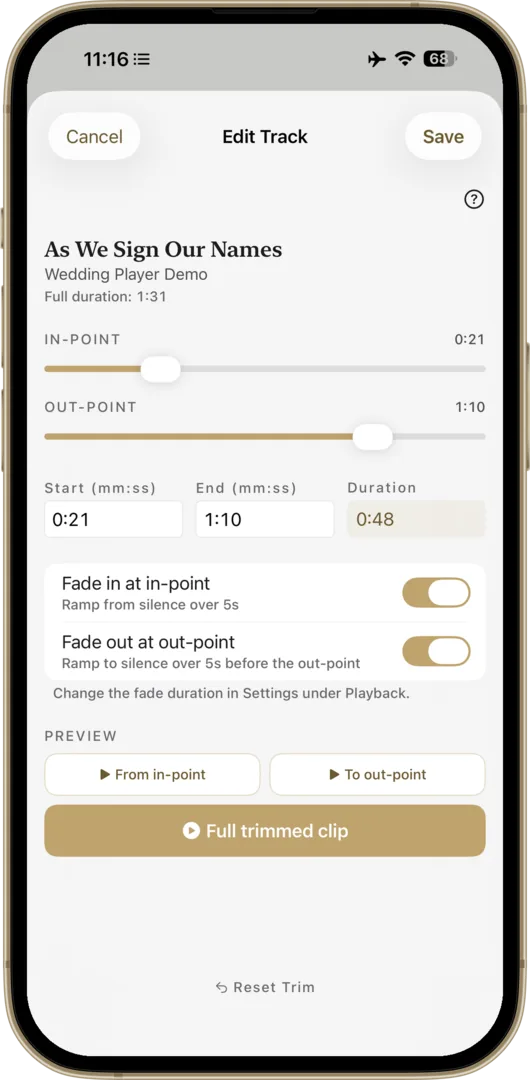
Intro too long? Song wrong length? Edit any track to start and stop exactly where you need it. Set fade-in and fade-out points, preview the trimmed clip inside the app, and the trimmed version is what plays on the day. No outside editor needed.

Trim and Fade editor Trim and Fade editor

Zero Signal? No Problem.

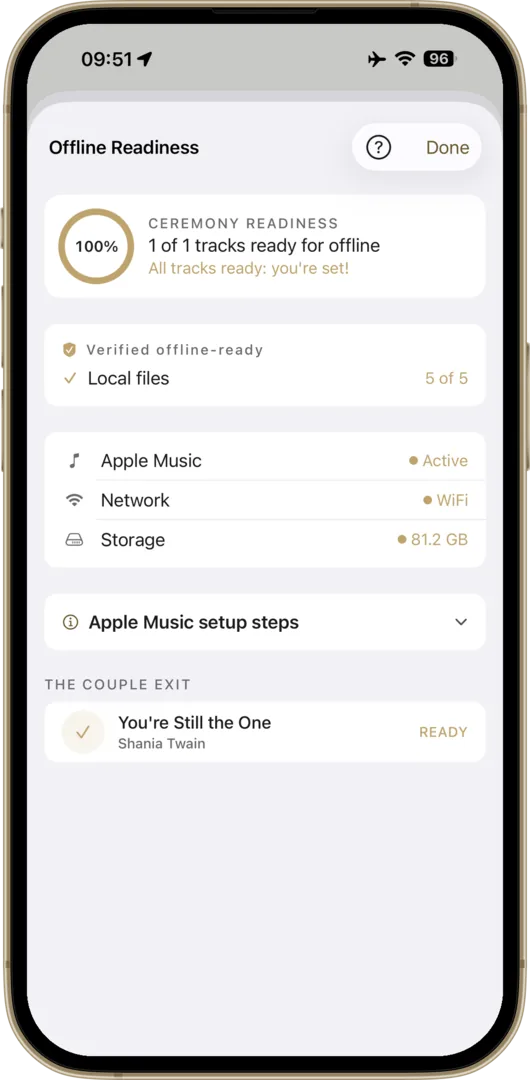
Most wedding venues can't guarantee reliable WiFi. Wedding Player stores every track on your device, and the Offline Readiness check verifies all of it before the day. No streaming, no buffering. Designed to work in airplane mode.

Offline Readiness check verifying all tracks are stored on device Offline Readiness check verifying all tracks are stored on device

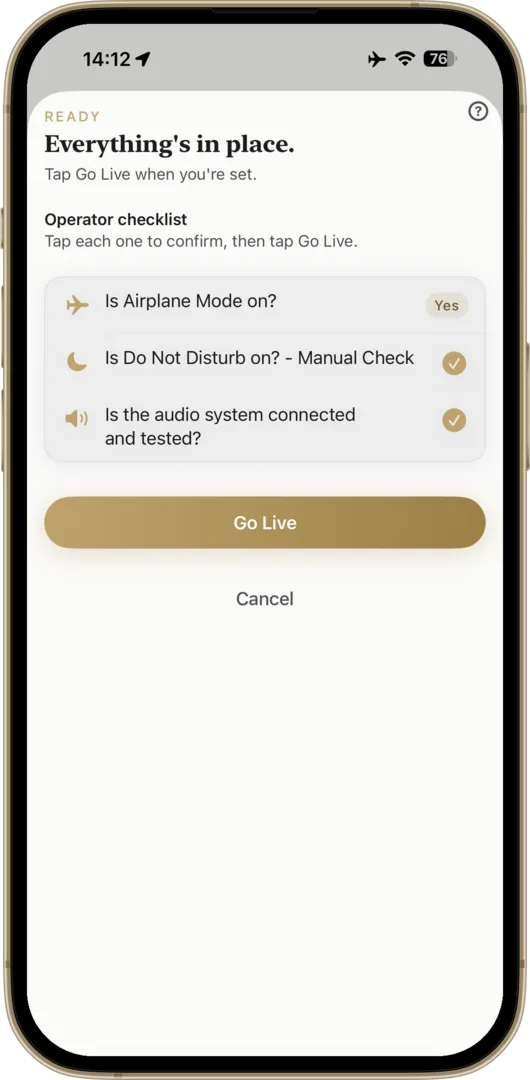
Panic-Proof Pre-Ceremony Check

A guided readiness sheet checks every track is downloaded, Airplane Mode is on, the battery is full, and Do Not Disturb is set, before Live Mode activates. Critical warnings surface at the top. Start the Ceremony only goes live when everything is green.

Pre-Ceremony Readiness check Pre-Ceremony Readiness check

Dedicated Go Live Mode

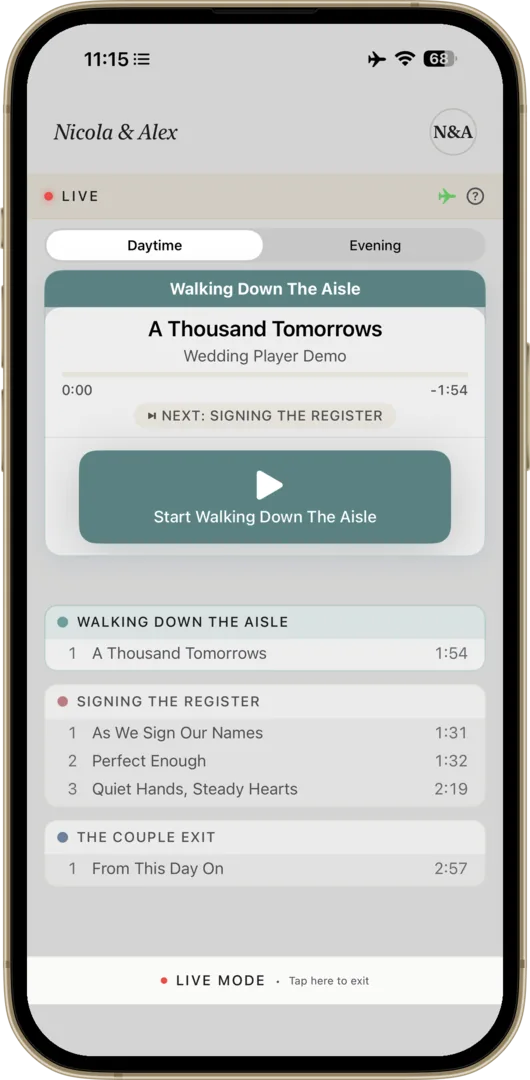
Run pre-ceremony checks, then tap Go Live and the playlist locks. No accidental taps, no wrong version. Extra-large controls and one-tap fade-out, timed to the moment.

Live Mode Live Mode
Features

Apple Music + Library + Files

Mix Apple Music tracks (iOS) with Wedding Player Originals and your own custom-edited files in one playlist. No other app does this.

Seamless Transitions

Smooth crossfades. No awkward silences, ever.

Ceremony Timeline

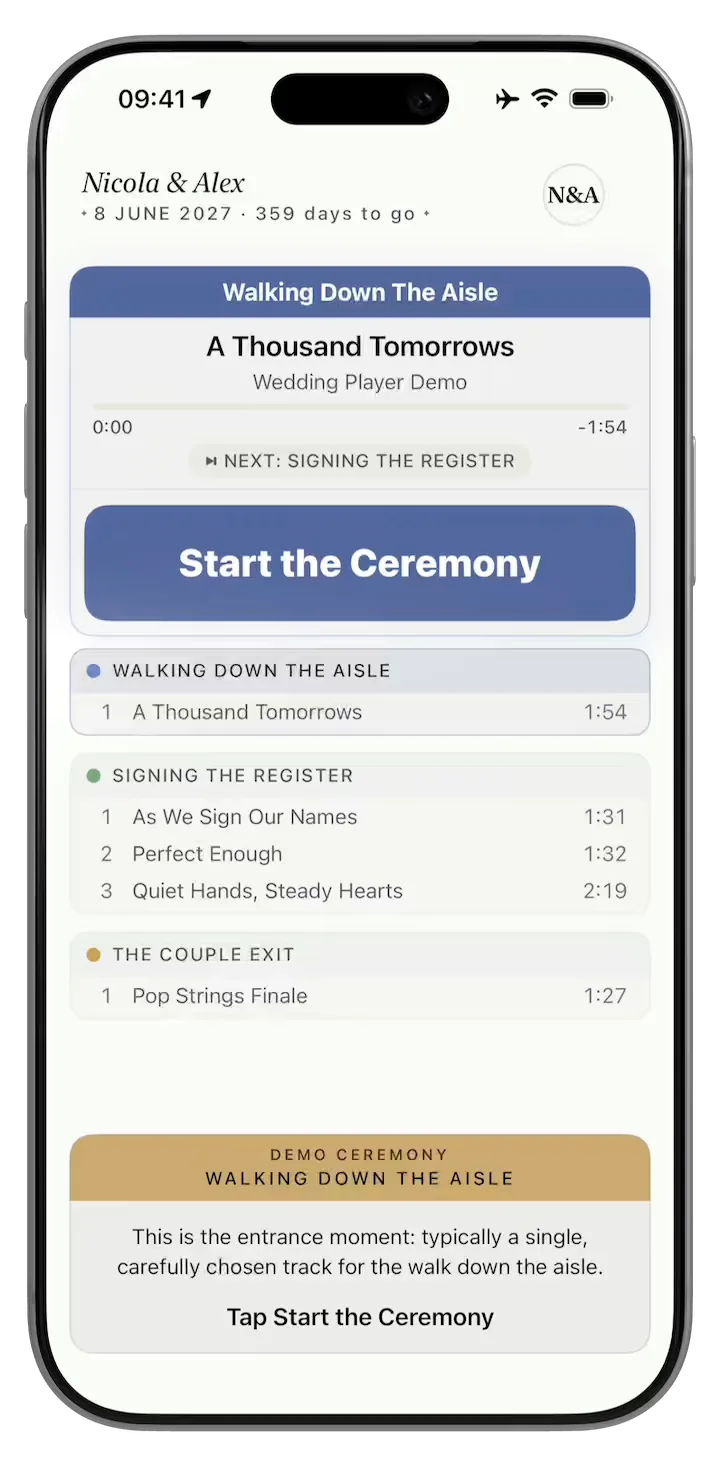
Custom moments, each with their own playlist and fade settings. Play a moment through or keep looping until you decide to stop.

Volume Normalisation

Quiet and loud tracks play at the same level. No frantic adjustments.

Loop & Auto-Advance

Set moments to loop until you're ready. Auto-advances to the next moment when you are.

Offline Checklist

Verify every Apple Music track (iOS) is downloaded before the day. No surprises.

Try Before You Buy

Free demo with sample tracks. Experience the full app before purchasing.

Unlimited Moments

Ceremony, cocktails, reception. Build as many moments as you need. Segmented into Daytime and Evening moments to plan your whole day.

Adjustable Text Size

Custom in-app text size, plus full Dynamic Type support across every screen. Anyone can read the controls, regardless of their iOS settings.

Live Mode Lock

Once Live Mode is on, the playlist locks. Switching moments asks for confirmation. The friend pressing play can't go off-script mid-ceremony.

Light or Dark Mode

Follows your iOS Display setting automatically, so the app matches the room. Lock to one mode in Settings if you prefer.

iPad and iPhone

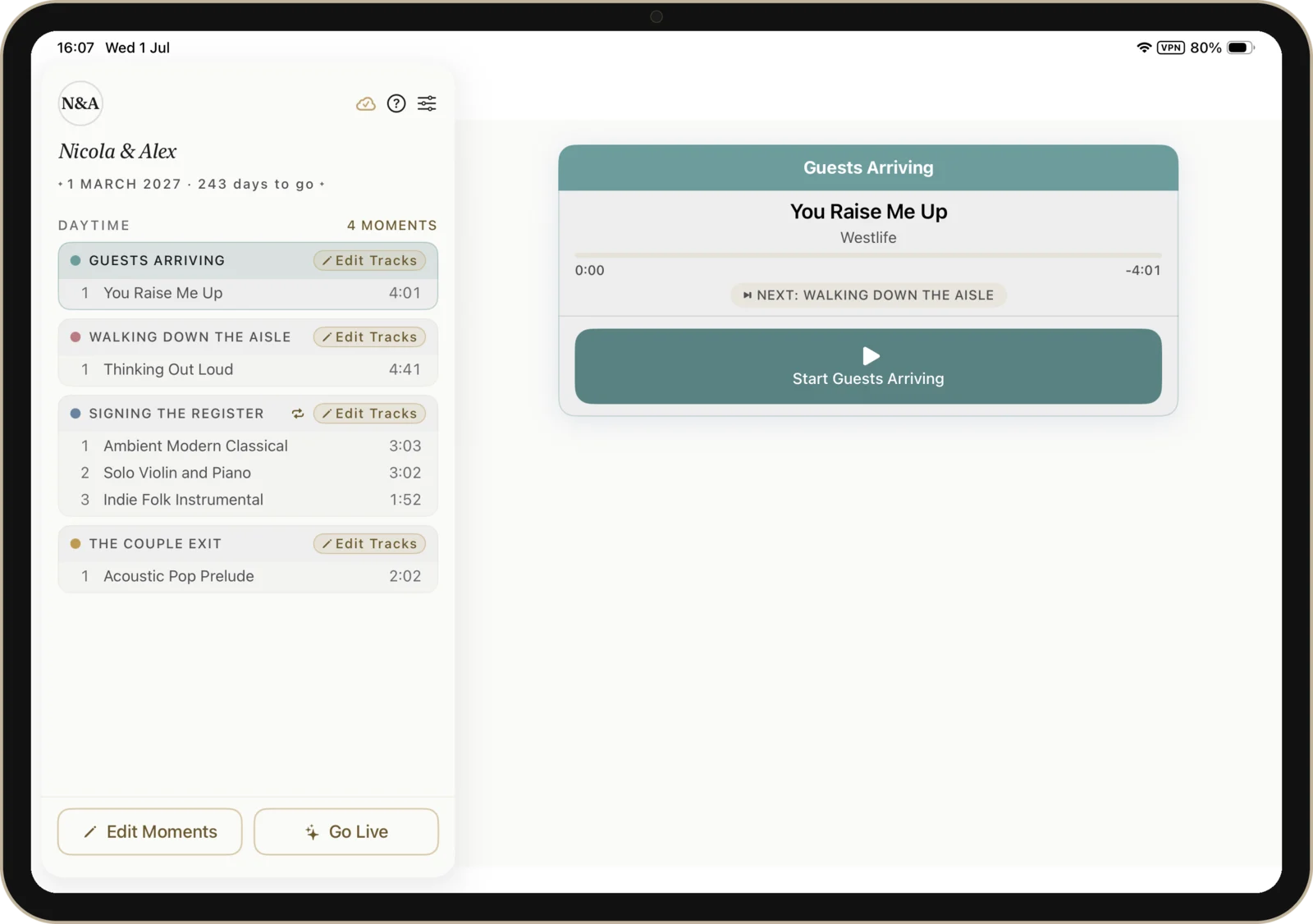
Universal app. Buy once and use it on every device with your Apple ID. iPad gets a split-view sidebar; iPhone runs single-pane.

New in v2.1.4

A new "Get more music" discovery sheet in every moment, multi-track Loop, automatic iOS Light or Dark mode, refreshed colour-matched player cards, and a sharper Pre-Ceremony Readiness check with a missing-tracks review screen.

Read full notes →
Your Music, Your Way

Three ways to add music. Mix any of them.

Apple Music (iOS)

Already have Apple Music? Pick any track from your library or the full Apple Music catalogue. Wedding Player is the ceremony layer on top.

Wedding Player Originals — no subscription needed

Wedding Player Originals is a curated collection of 40 fully licensed instrumental tracks. Prelude, processional, signing the register, recessional. Classical to contemporary. Updated over time, no app update needed.

Your own files

Drop in custom-edited MP3, M4A, WAV or AIFF. Perfect for the trimmed processional, the friend's cover version, or that one track that isn't on streaming.

Mix any of the three in a single ceremony timeline. Every track stored offline.

The Story

Built for a Real Wedding

I built Wedding Player for my daughter Nicola's wedding in March 2026. Nothing on the App Store did what we needed. It worked flawlessly on the day. The venue co-ordinator asked for a copy afterwards, unprompted.

– Don McAllister, father of the bride

Read the full story

Pricing

The Cheapest Line on Your Wedding Budget

Couples

£7.99
One-off purchase · No subscription

The cheapest line on your wedding budget. The most important one.

  • Unlimited ceremony events
  • Wedding Player Originals — curated ceremony tracks, no subscription needed
  • Mix Apple Music tracks (iOS) & custom files
  • Crossfade & fade-out transitions
  • Live Mode with locked, panic-proof controls
  • Volume normalisation across all tracks
  • 100% offline, works in airplane mode

One-time purchase. No ads. No tracking. Free demo included.

Download on the App Store Get it on Google Play — coming soon Free to Try Coming Soon

Managing multiple weddings? See the Professional Licence →

FAQ

Common Questions

Is it really only £7.99 for couples?
Yes, really. £7.99 is the full price for couples. One-time purchase, no subscription, no upgrades, no upsells, no hidden costs. Pay once and the app is yours forever. We get asked this a lot because most apps in 2026 are subscriptions; Wedding Player isn't. The separate £79.99/year Professional Licence is for venues, celebrants and planners running ceremony music across multiple weddings; couples don't need it.
Is Wedding Player a subscription?
No, not for couples. Wedding Player Full Access is a one-off purchase of £7.99 — yours forever, no auto-renewal, no recurring charges, ever. Buy it once and the app is yours for as many ceremonies as you want (your wedding, vow renewals, anniversaries). The separate Professional Licence (£79.99/year) for venues, celebrants, and co-ordinators IS an annual subscription, but that's only relevant if you're running multiple weddings as a business.
How much does it cost?
For couples: £7.99 one-off purchase, yours forever. No subscription, no ads, no tracking. For venues hosting multiple weddings: £79.99/year Professional Licence with easy reset between couples. Both tiers include a free demo mode so you can try everything before buying.
Do I need an Apple Music subscription?
No. Wedding Player includes Wedding Player Originals, a curated collection of 40 ceremony-ready instrumental tracks (prelude, processional, signing, recessional), all fully licensed for use in your ceremony. Apple Music is optional — use it if you want a specific song from your own library, or stick with Wedding Player Originals and your own audio files.
What’s in Wedding Player Originals?
Wedding Player Originals is 40 fully licensed instrumental tracks covering every part of the ceremony — 11 prelude, 11 processional, 10 signing the register, 8 recessional. Styles range from classical (Canon in D, Bach, Mendelssohn) to contemporary (modern piano, indie folk, soul brass). New tracks are added over time and appear in the app automatically — no update needed.
Can I use Spotify songs?
Spotify doesn’t allow third-party iOS apps to play its tracks, online or offline. The only option would be remote-controlling the Spotify app, which means ads on the free tier, no fade control, no ceremony timeline, and no protection if Spotify crashes mid-processional. For ceremony music, Apple Music is the right choice. Wedding Player builds directly on top of it. Most songs are available on both platforms. You can also pick from Wedding Player Originals or import any local audio file (MP3, M4A, WAV, AIFF). Read the full explanation.
Does it work without WiFi?
Yes. Every track is stored on your device. Works in airplane mode. No streaming, no buffering, no signal required.
Can’t I just use Apple Music?
Apple Music can’t mix streaming tracks with your custom-edited files in a single playlist. It has no ceremony timeline, no fade-out controls, and no protection against operator error. Wedding Player is the ceremony layer on top of Apple Music (iOS only), so your library is already there.
What if I need to pause or fade out?
One tap in either Rehearsal Mode or Live Mode. The track fades out smoothly over 2–15 seconds (you choose). You watch the room and end the music when the moment is right, not when the track decides to end.
Who presses play on the day?
Anyone you trust: a friend, a family member, your venue co-ordinator. Live Mode locks the playlist so they can’t accidentally play the wrong song or the wrong version. The controls are deliberately oversized, designed for nervous hands, not tech experts.
I don’t want to hand my personal phone to a stranger. What are my options?
Use iOS’s built-in Guided Access mode to lock your phone to Wedding Player and nothing else. The home button, app switcher, notifications, and every other app are all blocked while it’s on. Anyone holding the phone can only use Wedding Player. Setup takes 30 seconds. Step-by-step guide here.
Can I use it for the reception?
Yes. Create separate events for ceremony and reception, each with their own playlist and settings.
What devices?
iPhone and iPad running iOS 18 or later. Android is launching very soon — follow us on Instagram to be the first to know.
Is Wedding Player available on Android?
Android is coming very soon. The app has the same features as the iOS version — you can use your own music files, and we include Wedding Player Originals: 40 ceremony-ready instrumental tracks so you're ready to play straight away. Follow us on Instagram and we'll announce it there first.
How do I connect to the venue’s speakers?
Check with your venue. Many have Bluetooth connectivity to their PA system, so just pair your iPhone or iPad. Others have a 3.5mm aux input or a USB connection. Ask the venue co-ordinator before the day so there are no surprises. Bring a backup cable just in case. Read the full guide.

Your Ceremony. Your Music. Perfectly Timed.

Set it up once. Press play with confidence. The ceremony is the one part of the day you can't redo. Make the music perfect.

Download on the App Store Get it on Google Play — coming soon Free to Try Coming Soon
View Press Kit